
A desktop app for architects

Dvatone compositions in your own project

Compose multicolour palettes from the DVATONE collection, choose the colours for your composition and visualize it on a room wall straight away. For architects and interior designers.

The app is being prepared for release. Choose your system and leave a request: we will send the download link as soon as it is out.

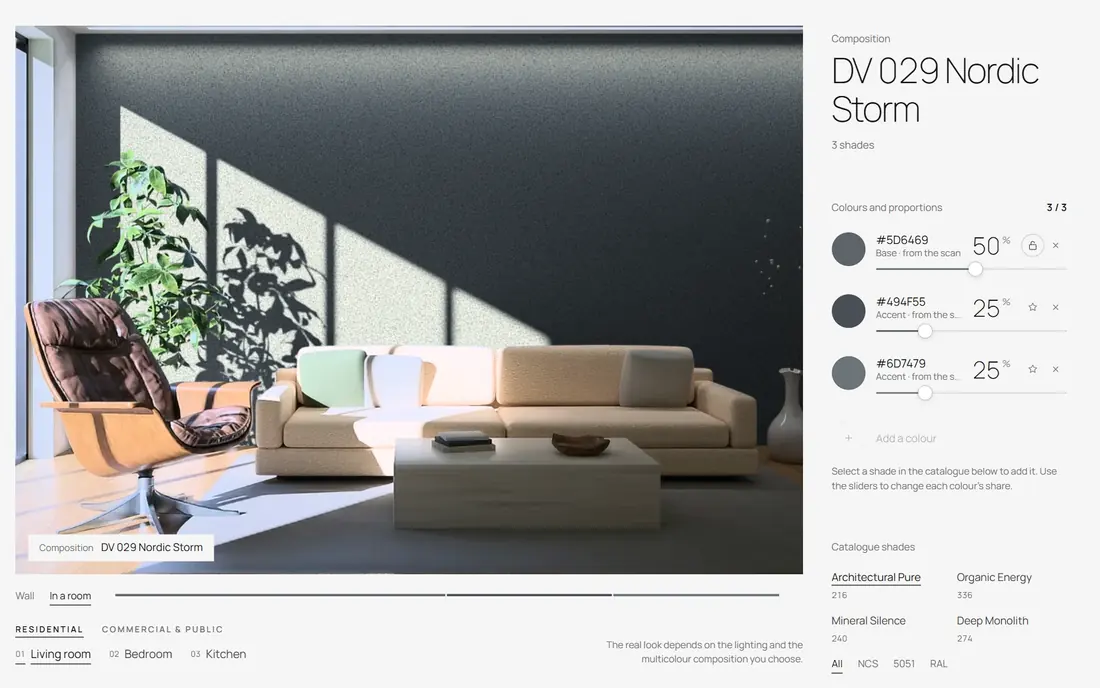
The app interface: the DV 029 Nordic Storm composition on a living-room wall
An interface preview from the working version of the Dvatone composition tool. The released app may look different.

01What it does

From the palette to a wall in a room

Everything you need to choose the multicolour coating for a project and show the solution to your client before it is applied.

Catalogue shades in NCS, 5051 and RAL in the app
01

Palettes from the DVATONE collection

Curated combinations from the DV collection (DV 004 Desert Silence, DV 033 Honey Cork, DV 056 Silver Frost, DV 029 Nordic Storm) or a composition of your own with 2 or 3 colours. Catalogue shades in NCS, 5051 and RAL, four categories and a search by code.

The DV 033 Honey Cork composition on the wall: the colours and their proportions
02

Proportions and tone

Sliders change the proportions of the colours, and the base colour can be locked. The tone of each colour can be changed too. The composition sits on a neutral backing, the granule at the scale of the scans.

The DV 033 Honey Cork composition on a living-room wall
03

Visualize it on a room wall

The same composition appears straight away on the wall of a photoreal room: residential (living room, bedroom, kitchen) and 8 commercial and public spaces.

The colour passport: proportions, recipe and volume
04

A colour passport in PDF

The composition you build is saved as a colour passport in PDF: the colour proportions, their article numbers, how the composition matches the overall tone, and the preparation recipe with the litres for the given volume.

02Request

Be among the first to get the app

We are preparing the app now. Leave a request and the download link for macOS or Windows will come to you as soon as it is out.

  1. 01

    Choose your system

    macOS or Windows.

  2. 02

    Leave a request

    Your name and a contact: e-⁠mail, phone or Telegram.

  3. 03

    Get the link

    As soon as the app is released, we will send you the download link.

Download request

We will send the link as soon as the app is out

System
Your consent to data processing is required

The app is still being prepared for release. The download link will reach the contact you give when the app is released.

Request receivedThank you. As soon as the app is released, we will send the download link to the contact you gave.